UniFi SSH password and username: defaults, lookup and reset
The UniFi SSH password depends on the state of the device. A factory-default access point or switch uses ui / ui, or ubnt / ubnt on older devices. Once a device is adopted, it switches to a random username and password. UniFi Network shows them under UniFi Devices > Device Updates and Settings > Device SSH Settings.
| Device | Before setup or adoption | After setup or adoption |
|---|---|---|
| Access points, switches | ui / ui (older devices: ubnt / ubnt) |
The site's random device SSH username and password |
| Consoles (UDM Pro, UNVR, Cloud Key) | root / ui (older devices: root / ubnt) |
root with the console's own SSH password, set in UniFi OS. SSH is off by default |
| Gateways (UXG) | root / ui (older devices: root / ubnt) |
root with the site's shared device SSH password |
These are the values in Ubiquiti's Connecting to UniFi with Debug Tools & SSH article, last edited in April 2026. Ubiquiti doesn't say which models count as older. If ui / ui fails on a reset device, try ubnt / ubnt.
Default SSH credentials, by device state
The default login only works while the device is in its factory-default state. That's the state it ships in, and the state it returns to after a reset.
Ubiquiti's release notes back up the newer default. UniFi Gateways firmware 3.2.15 (March 2024) fixed a bug where SSH sessions failed "while using ui/ui as credentials".
A few cases work differently:
- Adopted devices. Adoption replaces the default with the site's device SSH login. The default no longer works.
- Consoles. SSH is off until you enable it, whatever the password.
- Standalone access points. An AP set up in Standalone Mode gets its own password during setup. Ubiquiti says you'll find it in the UniFi mobile app under Configure > Device Credentials. It doesn't say whether that password is also the SSH login.
The SSH login is separate from your UI account and from the local admin login for UniFi Network. For those, see our post on UniFi default passwords and logins.
Where to find the SSH password for adopted devices
UniFi Network sets one SSH username and password for the devices in a site. To see them:
- In UniFi Network, open the UniFi Devices page.
- Click Device Updates and Settings, at the bottom of the left-hand panel.
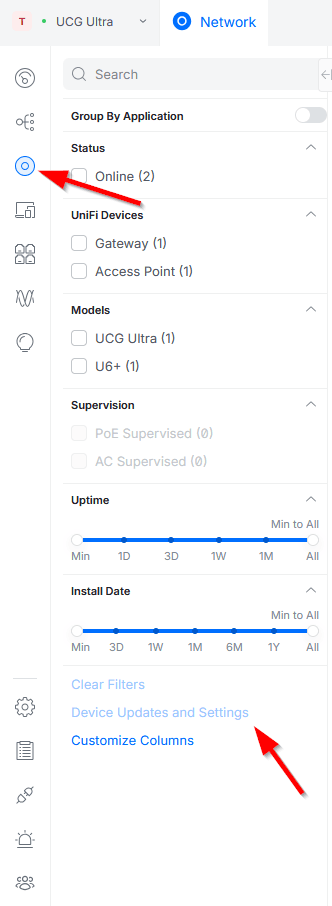
- Scroll to Device SSH Settings and look under Device SSH Authentication.
- Click the eye icon to show the password.
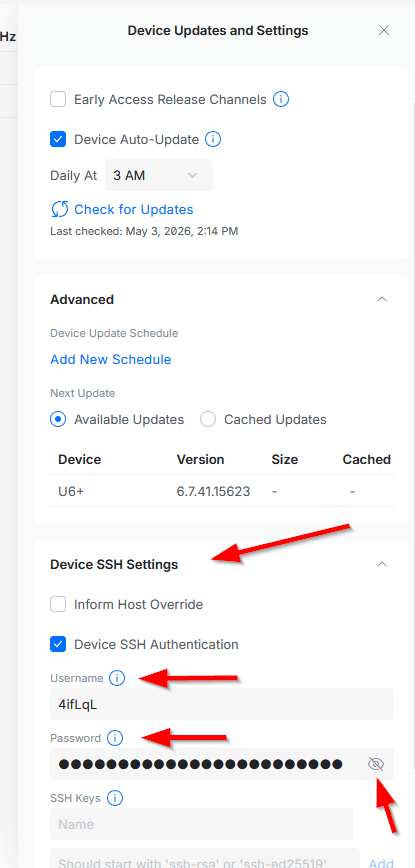
These screenshots are from UniFi Network 10.3.58 on a UCG Ultra, taken in May 2026. The username is a random string, like the 4ifLqL shown here.
UniFi Network 9.2.87 (June 2025) moved these settings to the Devices page. On older versions, and in some of Ubiquiti's own help articles, you'll still see the old location: Settings > System > Advanced > Device Authentication.
For the connection itself, our guide on how to SSH into UniFi APs, switches and consoles covers each device type step by step.
How to change the device SSH password
Change it in the same Device SSH Settings panel, by editing the username or password under Device SSH Authentication.
You can add SSH keys in the same panel, under SSH Keys. Paste the public key. UniFi Network accepts RSA keys, and ed25519 keys since version 9.0.108 (December 2024). Ubiquiti's Adding SSH Keys article shows how to create a key on Windows, macOS and Linux.
On a console, the root SSH password belongs to UniFi OS. Ubiquiti says consoles and devices have independent SSH settings. Its help center doesn't say where to change it. The SSH option itself is under Settings > Control Plane > Console, so look there first.
How to reset a lost UniFi SSH password
Which fix works depends on whether you can still open the controller that manages the device.
You can open the controller
Look the password up in Device SSH Settings, as above. Nothing needs resetting.
If you're about to move to a new controller, copy the SSH username and password first. Ubiquiti's Backups and Migration article recommends it, in case devices need help reaching the new controller.
You can't open the controller
Reset the device to factory defaults. It then accepts the default login again. Ubiquiti documents two ways (How to Reset UniFi Devices to Factory Defaults):
- Hold the reset button for 5 to 10 seconds, depending on the device, with the power on. Hold it too briefly and the device only reboots. Hold it too long and it enters TFTP recovery mode.
- Use Forget in UniFi Network. That removes the device and restores its defaults. It only works from the controller that manages it.
A reset wipes the device's configuration. You'll need to adopt it again.
The same applies to a device that shows as "Managed by Another Console" ("Managed by Other" in older versions). Ubiquiti gives three options. Restore the console from a backup, reset the device and adopt it again, or reassign it in the UniFi Network mobile app as the account owner.
Standalone access points
Ubiquiti says lost standalone credentials can't be recovered. Reset the AP and set it up again.
Console root password
If you can still log in to the console, check the SSH settings under Settings > Control Plane > Console. If you can't log in at all, that's a console login problem. Our guide to recovering a UniFi controller without credentials covers it.
Frequently asked questions
Is ubnt/ubnt still the default UniFi SSH password?
Only on older devices. Ubiquiti lists ui / ui for access points and switches and root / ui for consoles and gateways, with the ubnt versions for older devices.
Is the SSH password the same as my UniFi login?
No. Your UI account or local admin opens UniFi Network. Adopted devices use their own SSH username and password from Device SSH Settings.
Do all devices in a site share one SSH password?
Yes. UniFi Network shows one Device SSH Authentication username and password for the site, and Ubiquiti calls it the "shared password" when it explains UXG logins.
Can I change the SSH password with passwd on the device?
Use UniFi Network instead. Ubiquiti doesn't document changing device SSH passwords from the shell. The controller holds the credentials for adopted devices.
Final thoughts
In most cases the SSH password is still in Device SSH Settings, on the controller that manages the device. The hard case is a controller that's gone with no backup. Then every device needs a factory reset and a new adoption.
For your own network, a controller on a Cloud Key or a spare machine is fine, as long as you keep a backup. For client networks, we run UniFi OS Server for MSPs with daily backups on paid plans. That way there's always a recent copy of the controller that holds those credentials.